
How to Update DS4 AIM Premium
Watch the tutorial first, then open only the section you need using the expandable guide panels below.
Watch the update process
Start with the complete video, then use the expandable sections underneath for individual steps and troubleshooting.
01 Why you should update Benefits, fixes and compatibility improvements
Keeping DS4 AIM Premium updated helps ensure you receive the latest supported improvements, fixes and compatibility changes.
- Improved supported macros and anti-recoil behaviour.
- Support for newer game seasons and patches.
- Bug fixes and interface refinements.
- Improved licence synchronisation and security.
- New supported features and smoother performance.
02 How to update DS4 AIM Premium Use the built-in updater from the Settings tab
The built-in updater is the fastest way to install the latest available version.
- Open DS4 AIM Premium.
- Navigate to the Settings tab.
- Select Check for Updates Now.
- If an update is available, select Yes.
- Wait while the application downloads and installs the update.
- When DS4 AIM restarts, enter your licence key again if prompted.
- Restore any saved profile or feature settings.
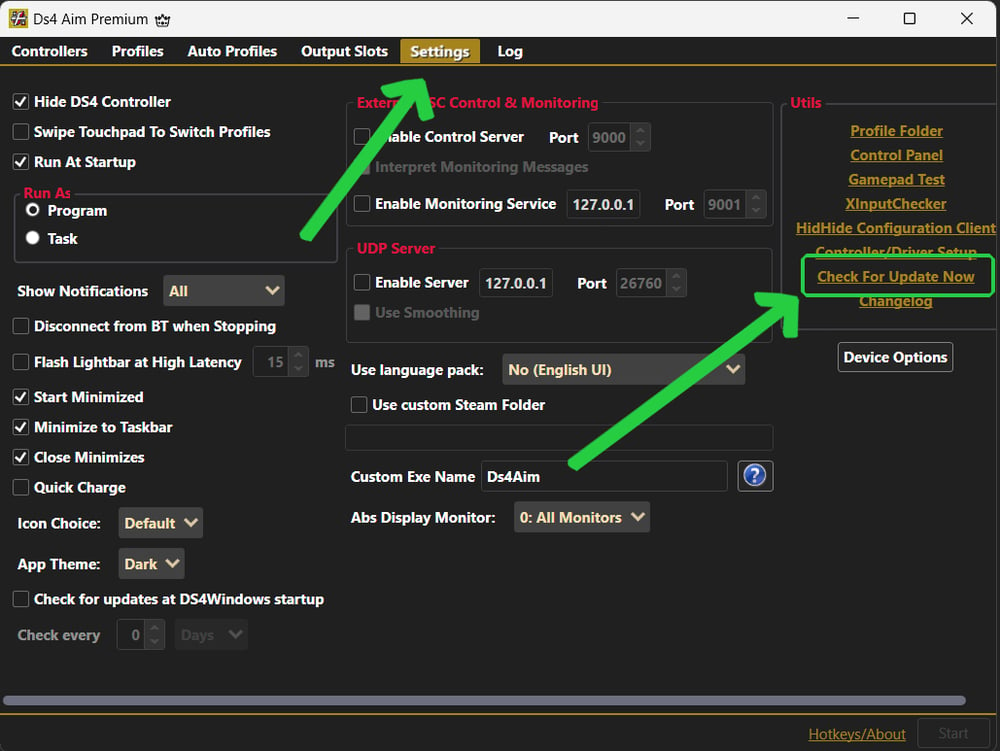
The original update screenshot from your existing DS4 AIM guide.
03 After the update Licence, controller and profile checks
Once the updated application opens:
- Confirm that the latest version launches correctly.
- Enter your licence key if requested.
- Reconnect your supported controller.
- Select the correct controller profile.
- Restore your preferred feature settings.
- Test controller readings before launching a game.
04 Troubleshooting update problems What to check if the update fails
- Confirm that the computer is connected to the internet.
- Close DS4 AIM and reopen it as Administrator.
- Check whether Windows security or antivirus software is blocking the updater.
- Restart DS4 AIM and check for updates again.
- Contact official DS4 AIM support if the issue continues.
05 What is included in updates? New features, compatibility and fixes
Update contents vary between releases. They may include:
- New macro behaviour.
- Recoil and tracking refinements.
- Game compatibility updates.
- Interface changes.
- Licence and security improvements.
- Bug fixes and performance refinements.
Common update questions
Quick answers to the questions customers ask most often before and after updating DS4 AIM Premium.
Yes. Updates may reset profile, recoil, tracking and macro values. Save important settings before beginning.
You may be asked to enter the same Payhip licence key again after DS4 AIM restarts.
No. Use the built-in updater unless an official DS4 AIM announcement specifically instructs you to reinstall.
The update may be incomplete. Reopen DS4 AIM as Administrator and run the update check again.
Security software can sometimes block newly downloaded applications. Confirm the update came from an official DS4 AIM source before allowing it.
No. The updater needs internet access to check for and download the latest supported version.
Profile selection or settings may reset. Confirm the correct controller profile after the application restarts.
Review official patch notes, product announcements or update messages for release-specific changes.
Older versions may no longer be supported. Use only versions supplied or approved through official DS4 AIM channels.
Include your purchase email, current version, Windows version, the error message and a screenshot where possible.
Join the DS4 AIM Discord
Need personal help with installation, activation, updating or controller setup? Join the official DS4 AIM Discord for support, announcements and community advice.